

Invoices
The Invoices page can be found in wp-dashboard→User Frontend→Settings.
The Invoices page lets you tweak several options relating to billing and invoice.
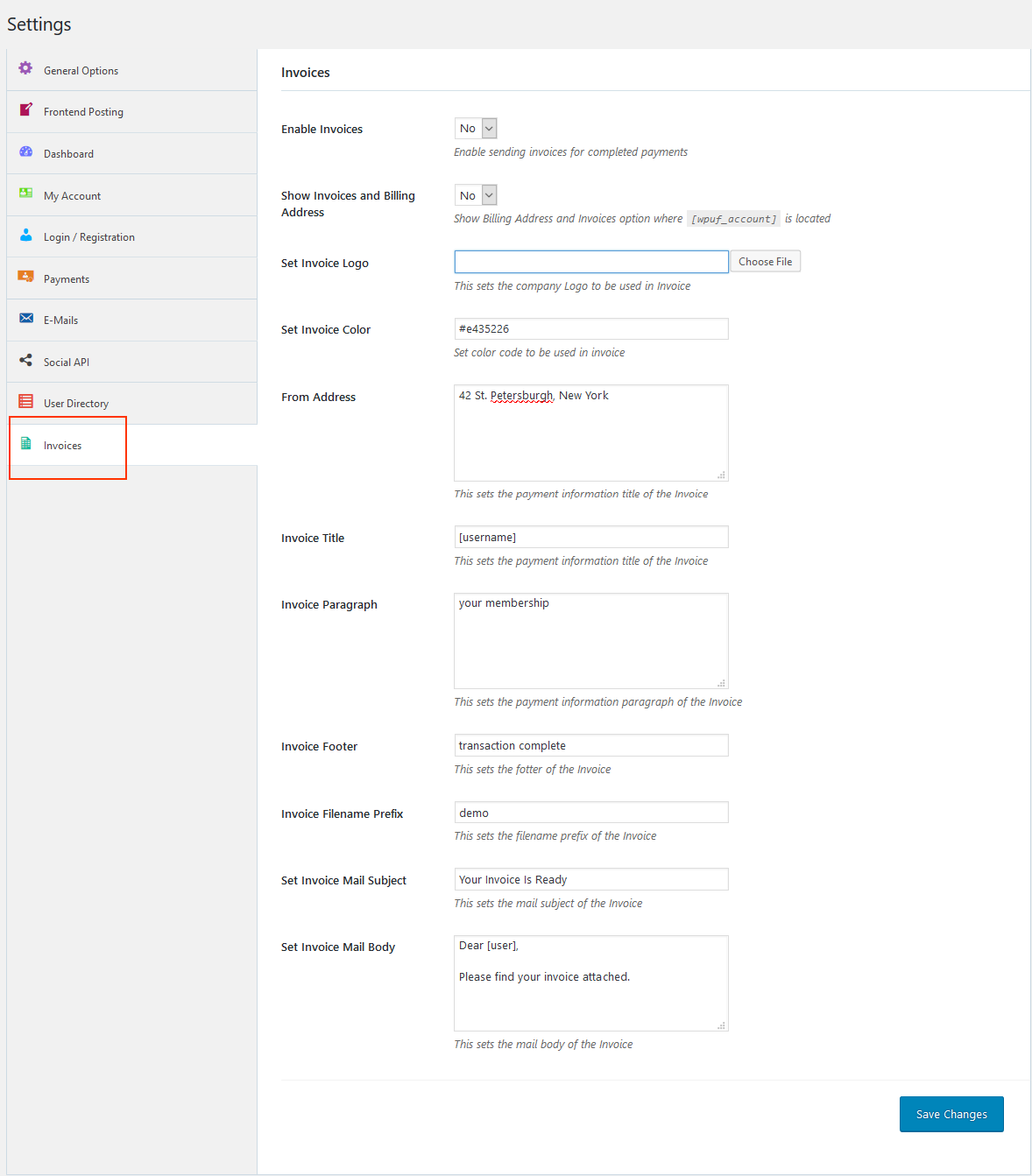
Options:
Section titled “Options:”- Enable Payments: To start sending invoices for completed payments, you first have to enable this option. Select Yes from the drop-down.
- Show Invoices and Billing Address: Select from the drop-down if you want to show Billing Address and Invoices where [wpuf_account] is located.
- Set Invoice Logo: This sets the company Logo to be used in your invoices.
- Set Invoice Color: Set the color code to be used in invoices.
- From Address: This sets the payment information title of the Invoice.
- Invoice Title: This sets the payment information title of the Invoice.
- Invoice Paragraph: This sets the payment information paragraph of the Invoice.
- Invoice Footer: This sets the footer of the Invoice.
- Invoice Filename Prefix: This sets the filename prefix of the Invoice.
- Set Invoice Mail Subject: This sets the mail subject of the Invoice.
- Set Invoice Mail Body: This sets the mail body of the Invoice.
For more on how to create payment invoices, read this related article.